


How High Should a TV Be Above a TV Stand? Mounting Height & Spacing Guide
Summarize with AI
Get a quick summary of this article using your preferred AI assistant.


How high should you mount your TV above a TV stand? For many living room setups, a gap of roughly 4–8 inches between the bottom of the TV and the top of the console is a useful starting point. But the right position also depends on your seated eye level, screen size, and furniture height.
A larger TV or taller console can change how much space is available beneath the screen. Before mounting, it's worth checking the viewing position and any soundbar or equipment you plan to use.
Here's what to consider for a comfortable, practical TV setup.
1. Quick Answer: How High Should a TV Be Above a TV Stand?
The suggested 4–8-inch gap is a planning reference, not a universal installation requirement. Your TV should be comfortable to watch from your usual seat, with enough clearance for the equipment beneath it.
Aim to position the center of the screen close to your natural seated eye level. Around 42 inches from the floor to the screen center can be an illustrative reference, but your actual eye height may be different.
If achieving a particular gap means mounting the TV uncomfortably high, consider a lower console or a different equipment arrangement instead. Always follow the clearance and installation requirements for your specific television and mounting hardware.
2. Understanding TV Mounting Height vs. TV-to-Console Distance
TV mounting height describes where the screen sits relative to the floor and your viewing position. TV-to-console clearance is the open space between the bottom of the television and the top of the furniture beneath it.
Three measurements are helpful to understand:
- TV center height: The distance from the floor to the middle of your television, which helps determine seated viewing comfort.
- TV bottom-edge height: The position of the television's lowest edge above the floor.
- TV-to-console gap: The vertical space between the TV's bottom edge and the console's top surface.
These measurements are related, but they're not interchangeable. You can have a comfortable screen position and still need more space beneath the TV for a soundbar or other equipment.

Understanding this difference helps you choose a comfortable TV position while keeping enough room above your console.
3. Where Should Your TV Sit for Comfortable Viewing?
Start by sitting on the couch or chair you normally use to watch TV. Look straight ahead in a comfortable position and note your natural eye level. The center of your television should ideally sit close to that viewing line.
A screen-center height of around 42 inches above the floor is one possible reference, but it won't suit every room or seating arrangement. Your couch height, posture, and viewing position all matter. Avoid raising the television unnecessarily just to create a smaller-looking gap above your console.
Before mounting, use painter's tape to mark the TV's actual outside dimensions on the wall. Check the proposed position from your usual seat and make sure the bottom of the screen leaves enough room for your console and equipment.
4. Does TV Size Change the Mounting Height?
Yes, TV size affects the amount of vertical wall space the screen occupies. If you keep the center of the television at the same height, a larger TV extends farther downward and leaves less clearance above the console.
55-Inch TV: More Clearance Below the Screen
A 55-inch TV generally occupies less vertical wall space than larger models. When mounted at the same screen-center height, it may leave more open space above your console.
That extra gap doesn't automatically mean the television is positioned too high. Check how comfortable the screen feels from your seat rather than adjusting it solely for appearance.
65-Inch TV: Check the Space for Equipment
A 65-inch TV extends farther downward than a 55-inch model when both share the same screen-center position.
Before mounting, check the television's actual exterior height and whether the remaining space is suitable for a soundbar or other equipment. There is no single ideal TV-to-console gap based on screen size alone.
75-Inch TV: Pay Closer Attention to Console Height
A 75-inch TV takes up even more vertical space. If the screen center stays near your seated eye level, the bottom edge may sit relatively close to the console.
Check the console height before deciding to raise the TV. A lower media console may give you the clearance you need without making seated viewing less comfortable.
Remember: Your television's advertised size is its diagonal screen measurement, not its overall height. Always check the manufacturer's actual exterior dimensions before deciding on a mounting position.
5. Choosing the Right TV Console Below a Wall-Mounted TV
When your TV is mounted on the wall, the console's height affects how much open space remains beneath the screen. A lower console generally leaves more clearance, while a taller one reduces the gap if the TV stays in the same position.
The three Loft Home consoles below illustrate how different furniture heights can affect your mounting arrangement.
LINEA: A Lower Console for More Vertical Clearance
The Scandinavian Oak Wood Sliding Door TV Console LINEA measures 15.7 inches high.
Its lower profile leaves relatively more vertical space beneath a wall-mounted television than the other two models in this comparison. The sliding-door design also provides enclosed storage below the screen.
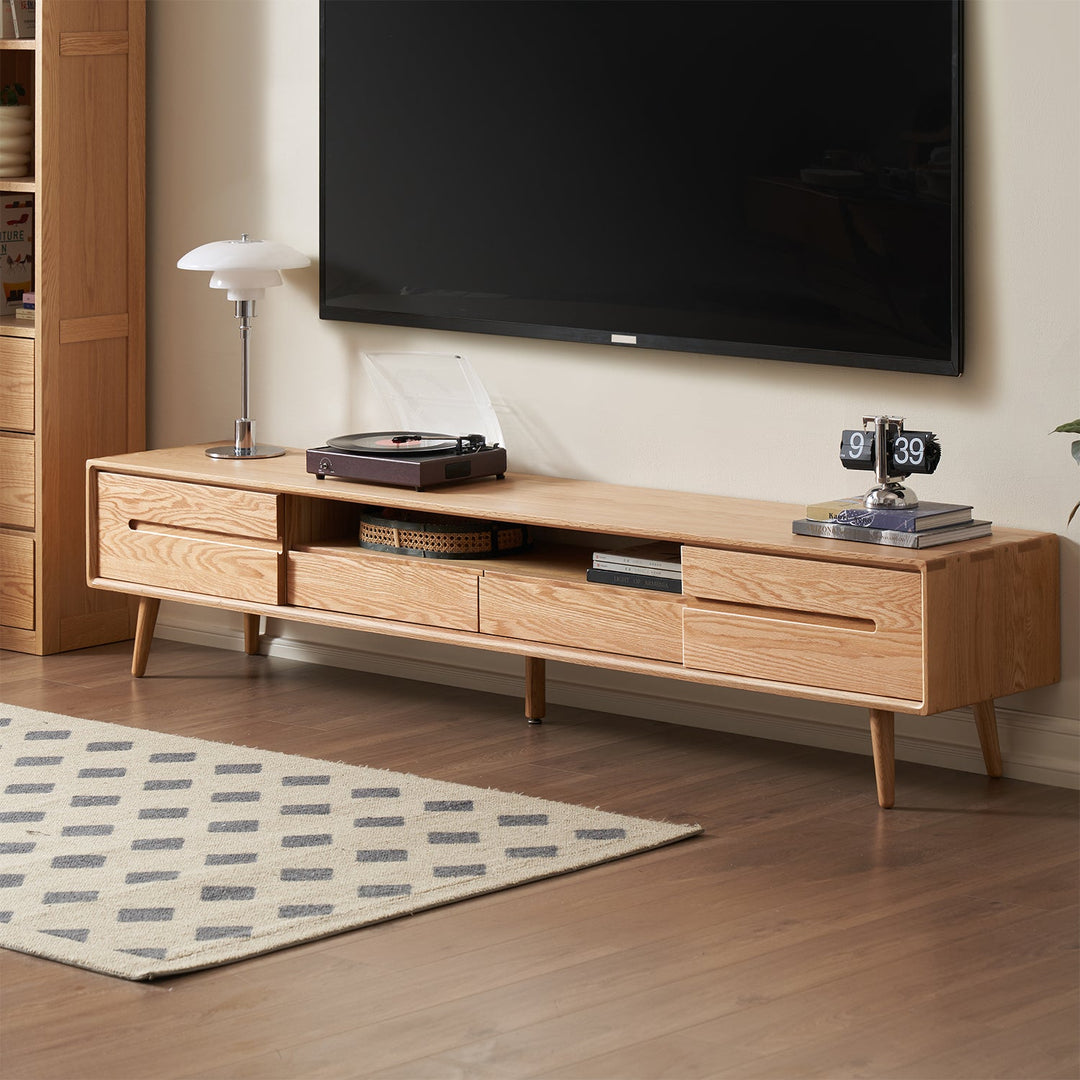
BERRY: A Middle-Height Option
The Scandinavian Oak Wood TV Console BERRY measures 17.7 inches high.
BERRY sits between LINEA and GREEN in height. It leaves less clearance than LINEA, but more than GREEN, when the television is mounted at the same position. Its drawers and compartments provide storage beneath the TV.

GREEN: A Taller Console That Needs More Clearance Planning
The Scandinavian Cherry Wood TV Console GREEN measures 19.7 inches high.
As the tallest of the three models, GREEN leaves the least vertical space beneath a TV mounted at the same height. Before choosing this arrangement, check whether the space above the console will accommodate your soundbar and any other equipment.

The important difference between these consoles is how their heights affect the available clearance. Choose a height that works with your preferred viewing position and the equipment you plan to place below the television.
If you're also deciding how a console will fit your room, our guide to TV consoles for small living rooms covers furniture types, storage, and floor-space planning.
6. Planning for Soundbars, Cables, and Equipment
Your TV-to-console gap may also need to accommodate a soundbar, accessible connections, and equipment ventilation. Check these requirements before finalizing the mounting position.
Leave Room for a Soundbar
If your soundbar sits on the console, measure its actual height and check the manufacturer's required clearance.
Some soundbars, particularly those with upward-firing speakers, may need additional unobstructed space above them. Make sure the soundbar doesn't block the television's picture, remote sensor, or sound output.
A wall-mounted soundbar can be another option, but its compatibility and mounting position should be checked separately.
Plan Cable Routing Before Mounting
Think about where your TV's power and HDMI connections are located and whether they'll remain accessible after installation. Check that cables can reach your equipment without being pinched or strained.
An external cable cover may be simpler than routing wires through the wall. For concealed wiring, use an appropriate in-wall power and cable-management solution that complies with applicable local electrical codes. Never run ordinary extension cords or power strips through wall cavities. If you're unsure about the electrical installation, consult a qualified electrician.
Keep Equipment Accessible and Ventilated
Make sure there's enough room to access connections and that the TV, soundbar, and other devices receive the ventilation required by their manufacturers.
A visually balanced gap doesn't necessarily provide sufficient clearance for every device. Always check the instructions for your specific equipment.
7. Final Checks Before Mounting
Before drilling, make one final check of your TV's intended position.
- Check seated viewing comfort. Sit in your normal viewing position and confirm that the proposed screen height feels natural.
- Mark the TV's outline. Use painter's tape and the television's actual exterior dimensions to visualize its position on the wall.
- Check the gap above the console. Make sure there's enough space for the furniture, soundbar, cables, and other equipment.
- Verify the wall and mounting hardware. Check the TV's weight, VESA mounting-hole pattern, bracket compatibility, and wall construction. Wood-framed drywall, concrete, and other wall types may require different approved mounting methods and hardware. Follow your TV and mount manufacturers' instructions, including the correct bracket and drilling positions.
- Review the position before drilling. Check the screen from your seat, look for reflections, and confirm access to connections and equipment.
If the television would need to be mounted uncomfortably high just to clear the console, reconsider the furniture height or equipment arrangement.
For uncertain wall conditions or mounting requirements, consult a qualified installer.
Final Thoughts
A comfortable TV setup starts with your viewing position, not just the gap above the console. Use the suggested spacing as a starting point, then consider your TV size, furniture height, and soundbar requirements.
Before mounting, check your equipment's actual dimensions and make sure the screen feels comfortable to watch from your usual seat.
Frequently Asked Questions
Quick answers to common questions about wall-mounted TV height and console clearance.
How many inches should a TV be above a TV stand?
A gap of roughly 4–8 inches can be a useful starting point, but it's not a universal requirement. Prioritize comfortable seated viewing and leave enough space for your equipment and the manufacturer's required clearances.
Is 42 inches the right height for a wall-mounted TV?
Around 42 inches from the floor to the screen center is an illustrative reference, not a fixed rule. Your ideal height depends on your seated eye level and usual viewing position.
Should a 75-inch TV be mounted higher than a 55-inch TV?
Not necessarily. A larger TV extends farther downward when its center stays at the same height. Before raising the screen, consider whether a lower console would provide enough clearance while preserving comfortable viewing.
How much room should I leave for a soundbar below the TV?
Measure your soundbar's height and follow its manufacturer's clearance requirements. Make sure it doesn't block the TV's screen or remote sensor. Models with upward-firing speakers may need additional unobstructed space.
Can a wall-mounted TV sit directly above a media console?
Yes. A wall-mounted TV can be positioned above a media console when the wall, mount, and installation are suitable. Leave enough clearance for your equipment, ventilation, and comfortable viewing. The console should not be needed to support the wall-mounted TV.
Find a TV Console That Fits Your Mounting Plan
Compare console heights, storage layouts, and dimensions to find furniture that works with your screen position and the equipment below it.
Explore Loft Home TV Consoles


